
Scheduling Without
the Headache
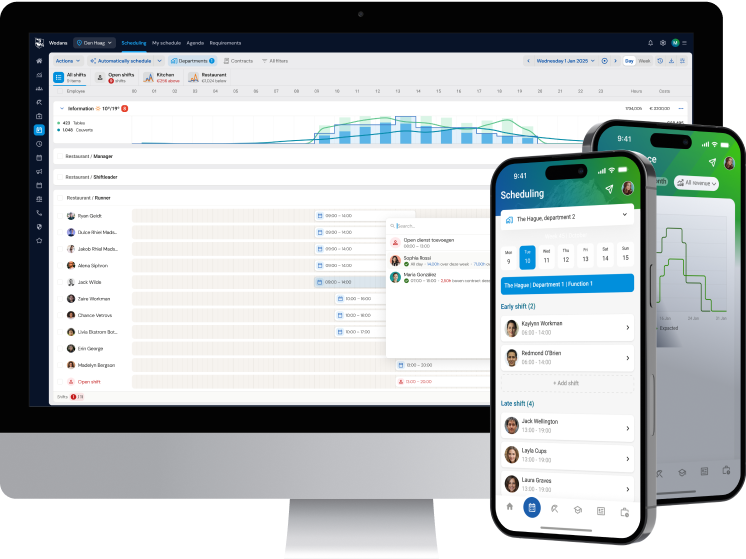
Getting the right people on the floor, within availability and budget, takes structure and clear oversight. With a schedule that’s right the first time, operations keep moving and teams stay calm and focused.
- Plan faster with templates and drag & drop
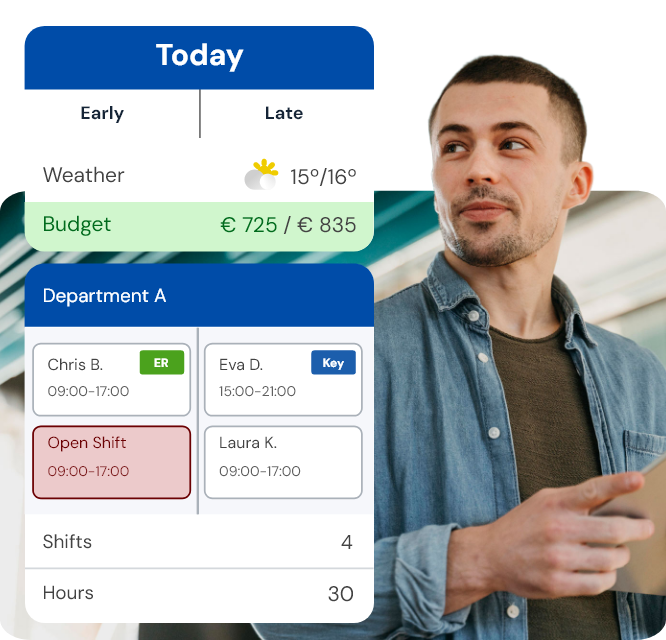
- Keep labour costs visible while scheduling
- Create and adjust schedules directly in the app
- Automatic notifications keep employees up to date
They are already scheduling with ease













Scheduling Software in One Clear Overview
No more separate Excel sheets, emails, or handwritten notes to track availability and time off. Everything you need is in one place: clear, current, and easy to manage.
- Employee availability
- Certifications, such as first aid and emergency response
- Contract details, including time-for-time balance
- A clear view of how many hours employees are already scheduled



Create the Right Schedule, Faster
Create standard templates and roll them out across multiple weeks. Need to make a change? Update the schedule immediately. Drag & drop lets you adjust shifts with ease.
If gaps appear, open shifts are shown automatically so employees can sign up. This helps you fill the schedule quickly, without losing oversight.

Crystal-Clear Communication Through Scheduling Software
Schedules and updates are right away visible to employees in the app. Time off and availability are managed in one place. No separate messages, no misunderstandings. Everyone works with the same information.

Save Up to 10% on Labour Costs
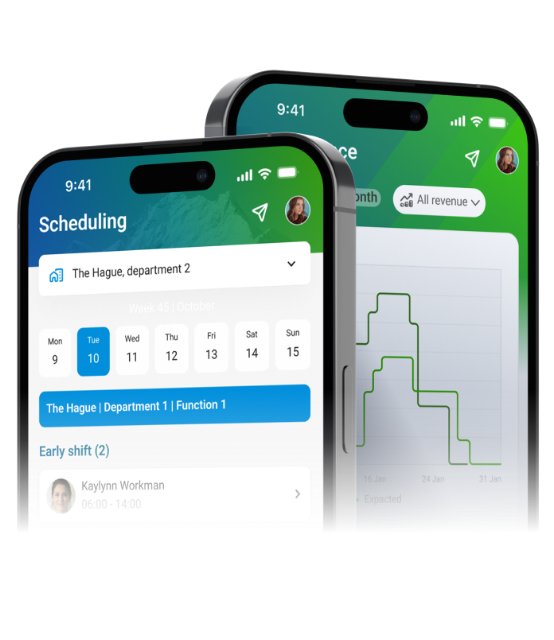
Save up to 10% on labour costs by preventing both overstaffing and understaffing. Labour Demand Forecasting calculates exactly how many employees you need. This helps you schedule more efficiently and reduce labour spend.

Auto-Scheduling: Schedules Created Automatically
Scheduling employees with fixed working days is simple. Flexible staff is where it gets tricky. It quickly becomes a complex puzzle, taking availability, contracts, time-for-time balances, and skills into account.
Auto-Scheduling does the work for you, generating a complete schedule right away that takes every constraint into account.

FAQ
Met Dyflexis wordt het maken van een rooster een stuk eenvoudiger. Je bespaart tijd, voorkomt fouten en behoudt altijd het overzicht. Zo doe je dat:
- Work with standard schedules. Create one or more standard schedules for quiet, average or busy days. Choose which schedule you want to roll out and adjust it to the expected workload.
- Make changes easily, even via the app. Something changed? No problem. You can make changes quickly and easily via your laptop or the Dyflexis app, wherever you are.
- Use open shifts to fill gaps. Is there a gap in your schedule? Create an open shift. Employees can sign up via the app. You decide whether the shift is automatically assigned to the first person to respond, or whether you make your own choice from among those interested.
- Ensure the right qualifications on the work floor. Do you always want a first aid officer or manager on the floor? Dyflexis automatically takes the necessary skills into account and ensures that the right people are in the right place.
- Let Dyflexis plan automatically. Indicate how many employees you need per hour. Dyflexis automatically creates the most optimal schedule based on availability, contract hours and skills of your staff.
With Dyflexis, you can keep control of your schedule, save time, and make things easier for your employees.
Dyflexis distinguishes itself from other scheduling software by combining simplicity with advanced functionalities. For example, Dyflexis offers automatic planning, allowing you to create a schedule at the touch of a button. Of course, this schedule takes into account the availability, contracts and skills of the employees. In addition, Dyflexis supports the creation of shift schedules, which is ideal for companies that work with different shifts. Dyflexis also distinguishes itself with an app with administrator functionalities. This allows managers to easily adjust schedules, register hours and process leave requests. Finally, Dyflexis has powerful calculation capabilities, enabling it to comply with even the most complex collective labour agreements.
Dyflexis scheduling software offers a powerful solution for companies looking for a user-friendly way to manage schedules. Whether you have dozens of employees or want to schedule thousands, Dyflexis supports every size. Dyflexis offers automatic scheduling, allowing you to generate a complete schedule in seconds, based on availability, contract details and skills. Dyflexis is also ideal for companies that work with different shifts or teams, as it has a special shift schedule module. This allows you to quickly and easily create schedules for a complete shift cycle. In addition, the software offers integrations with other systems, such as payroll administration, cash register systems and BI tooling.
Dyflexis offers numerous advantages that make managing your work schedules easier, more efficient and more transparent:
- Create schedules quickly and easily. Thanks to the integration of standard schedules, availability and employee contract details, you can quickly create a schedule. Leave requests are processed automatically, so you no longer have to work with paper or separate emails. Everything is clearly organised in one place, saving you time and effort.
- Clear communication with employees. Employees always have the most up-to-date schedule at their fingertips via the app. They know exactly when they need to work and can submit their holiday requests and see whether they have been approved. This prevents miscommunication and ensures clear expectations.
- Transparency regarding time registration. Employees can view their worked hours and see which hours they will be paid for. This ensures that there are no misunderstandings about hours and salary, which strengthens the relationship with your team and prevents potential conflicts.
- No time-consuming calculations of breaks and allowances. Dyflexis automates the calculation of breaks, hours worked and allowances. With the option of using a clocking system, employees can clock in and out, and breaks and allowances are calculated automatically. This saves time and prevents errors, allowing you to focus on other important matters.
- Insight into efficiency and productivity. Thanks to the extensive reporting options, you gain insight into the efficiency of your planning. How do personnel costs relate to turnover? Has a lot of overtime been worked? These reports help you to optimise your processes and control costs.
- Integration with your systems. Dyflexis integrates easily with other systems such as payroll administration, cash register systems and BI tools. This ensures that your data is shared seamlessly and that you can work even more efficiently, without having to transfer data manually.
Dyflexis gives you more control over your work schedules, communication and the efficiency of your organisation, saving you both time and money.
More than just scheduling
Creating schedules
The software helps you build schedules quickly, with clear oversight from the start. Availability, labour costs, and budgets are built in from day one. The result is a schedule that works, without extra steps.
Time Tracking
Working hours are recorded clearly and consistently. Overtime, time-for-time, sick leave, and time off are automatically included in the same system. This gives you one complete overview of recorded hours, without separate systems or manual adjustments.
Rex-O-Matic NOA
Employees clock in and out easily using a personal card, such as a public transport card or a bank card. Working hours are recorded automatically. Personal to use, designed with privacy in mind.


The complete workforce management system,
which ensures the right person, with the right skills in the right place